LEARNING CHORDS ON YOUR OWN?
Get Your Own 24/7 Chord TutOR*
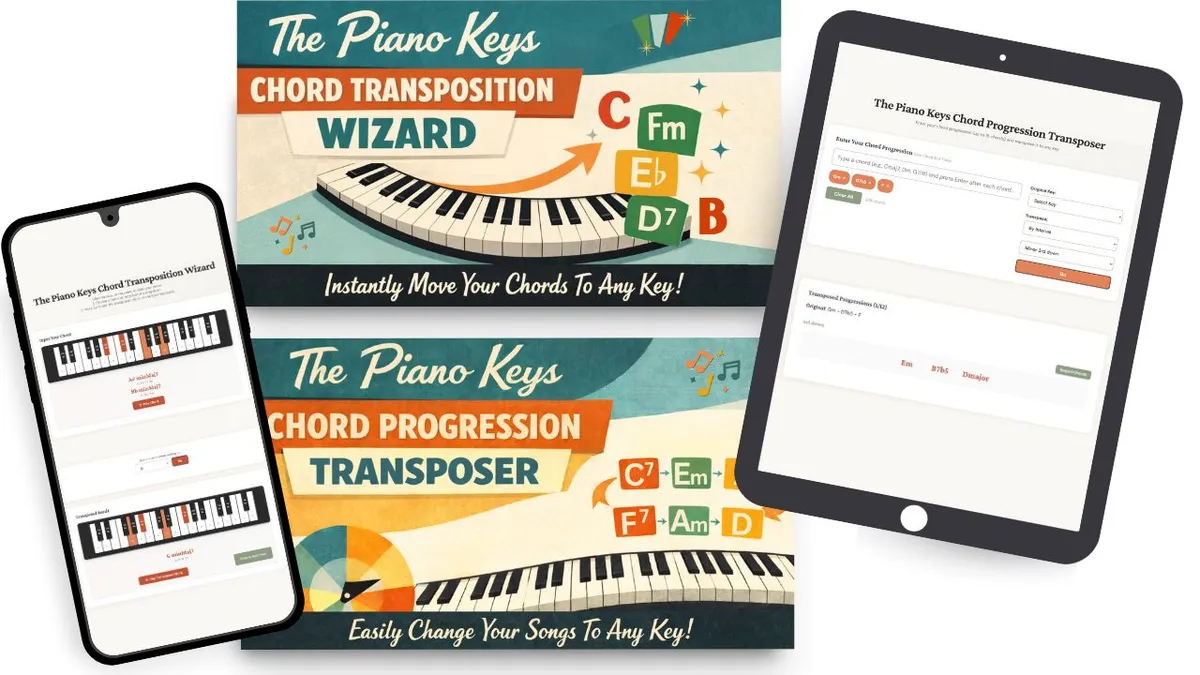
Use On Any Device
instant feedback
to keep you
on the right track
*For a fraction of the cost of just one piano lesson

"Your transposer tool for progressions is very useful and easy to use!" — Steve
"I used this to change a song to a key that was a better fit for my voice and it was perfect." — Ryan
"Just got the Chord Transposition tool and I love it." — John
LEARNING CHORDS ON YOUR OWN?
Get Your Own 24/7 Chord TutOR*
Use On Any Device
instant feedback
to keep you
on the right track
*For a fraction of the cost of just one piano lesson
"Your transposer tool for progressions is very useful and easy to use!" — Steve
"I used this to change a song to a key that was a better fit for my voice and it was perfect." — Ryan
"Just got the Chord Transposition tool and I love it." — John
LEARNING CHORDS ON YOUR OWN?
Get Your Own
24/7 Chord TutOR*
instant feedback
to keep you
on the right track
*For a fraction of the cost of just one piano lesson
Use On Any Device
"Your transposer tool for progressions is very useful and easy to use!" — Steve
"I used this to change a song to a key that was a better fit for my voice and it was perfect." — Ryan
"Just got the Chord Transposition tool and I love it." — John
Interactive Tools To Help You Master
Chords And Progressions
I love teaching my students how to build, play, and identify chords...
because real chord knowledge gives you
so much freedom as a pianist.
Mastery of chords gives you the power to:
Learn music faster
Remember it longer
Memorize more securely
Play from lead sheets
Play by ear
Improvise music
Compose music
And I wanted to share everything I've learned
about chords with as as many people as possible.
So I created lots of videos and online courses
to help adults everywhere learn all about chords.
I've received many really wonderful comments and emails
thanking me for making this knowledge available.
I've also received many questions,
most of them basically asking me
to "check the work" of people who
have learned from my online products.
But, here's the thing...
👉 There's only one of me, and my schedule is super busy
👉 I can't give live, real-time answers when they are needed
But I DO want to help.
So I thought it about how I could do that in a meaningful way.
I bounced around a few ideas,
and after some trial-and-error,
I came up with a convenient (and inexpensive) solution:
Two simple tools to help my students with their chord studies.
Interactive Tools To Help You Master
Chords And Progressions
I love teaching my students how to build, play, and identify chords...
because real chord knowledge gives you
so much freedom as a pianist.
Mastery of chords gives you the power to:
Learn music faster
Remember it longer
Memorize more securely
Play from lead sheets
Play by ear
Improvise music
Compose music
And I wanted to share everything I've learned
about chords with as as many people as possible.
So I created lots of videos and online courses
to help adults everywhere learn all about chords.
I've received many really wonderful comments and emails
thanking me for making this knowledge available.
I've also received many questions,
most of them basically asking me
to "check the work" of people who
have learned from my online products.
But, here's the thing...
👉 There's only one of me, and my schedule is super busy
👉 I can't give live, real-time answers when they are needed
But I DO want to help.
So I thought it about how I could do that in a meaningful way.
I bounced around a few ideas,
and after some trial-and-error,
I came up with a convenient (and inexpensive) solution:
Two simple tools to help my students with their chord studies.
Interactive Tools To Help You Master
Chords And Progressions
I love teaching my students how to build, play, and identify chords...
because real chord knowledge gives you
so much freedom as a pianist.
Mastery of chords gives you the power to:
Learn music faster
Remember it longer
Memorize more securely
Play from lead sheets
Play by ear
Improvise music
Compose music
And I wanted to share everything I've learned
about chords with as as many people as possible.
So I created lots of videos and online courses to help adults everywhere learn all about chords.
I've received many really wonderful comments and emails thanking me for making this knowledge available.
I've also received many questions, most of them basically asking me to "check the work" of people who
have learned from my online products.
But, here's the thing...
👉 There's only one of me, and my schedule is super busy
👉 I can't give live, real-time answers when they are needed
But I DO want to help.
So I thought it about how I could do that in a meaningful way.
I bounced around a few ideas,
and after some trial-and-error,
I came up with a convenient (and inexpensive) solution:
Two simple tools to help my students with their chord studies.
The Piano Keys
Chord Transposition Wizard
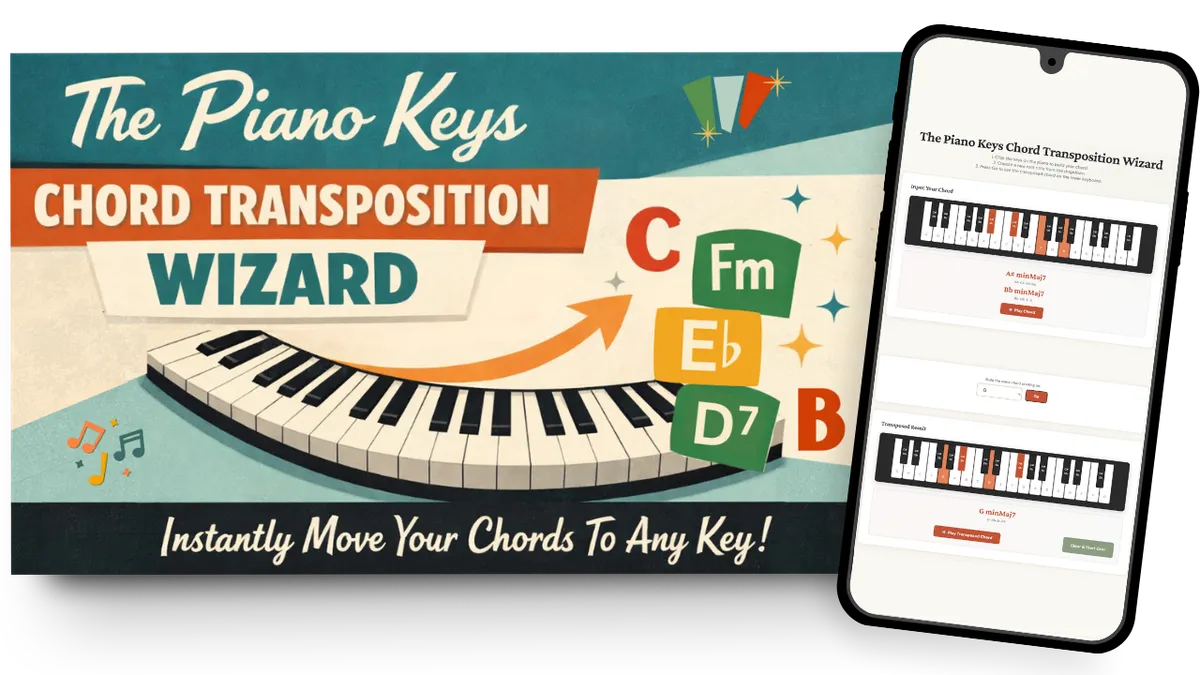
An interactive tool that's like having
a theory teacher by your side, anytime you need one.
How You'll Use It
Building a chord and
not sure if you got it right?

Input your notes into the Chord Transposition Wizard by clicking the keys on the keyboard.
The Wizard instantly identifies your chord, shows you alternative names (yes, the same notes can make chords with different names), and tells you which inversion it is.

Click the piano keys to build a chord
The Chord Transposition Wizard tells you the name of the chord, its inversion, and what notes are in it
Click the "Play Chord" button to hear how it sounds
Learned your chord starting on a certain note and you're ready to build that same chord on a different note?
Transposing chords is one of those skills that takes practice, but the benefits you gain are totally worth the effort.
Work out your answer first, then use the Chord Transposition Wizard to check it: enter your original chord, select your target key, and see if your transposition matches. When it doesn't, you'll catch exactly where you went wrong.
Click the drop-down menu to select the new note you want your chord to be built on
The Chord Transposition Wizard scrolls down to show you a keyboard with your new chord notes
The name and notes of your new chord are displayed beneath the keyboard
Click the "Play Transposed Chord" button to hear the chord in the new key
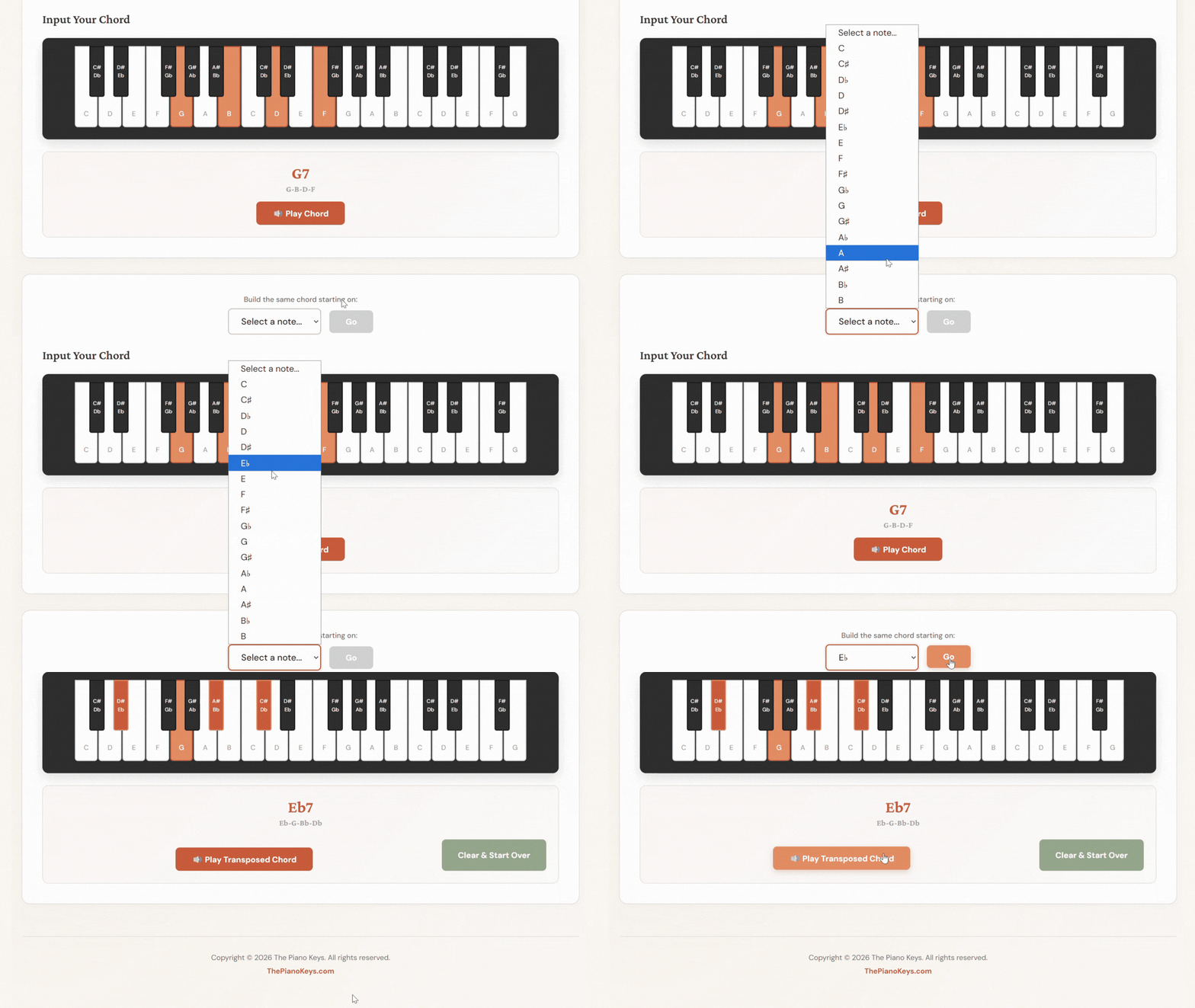
Works for any chord built on any key.
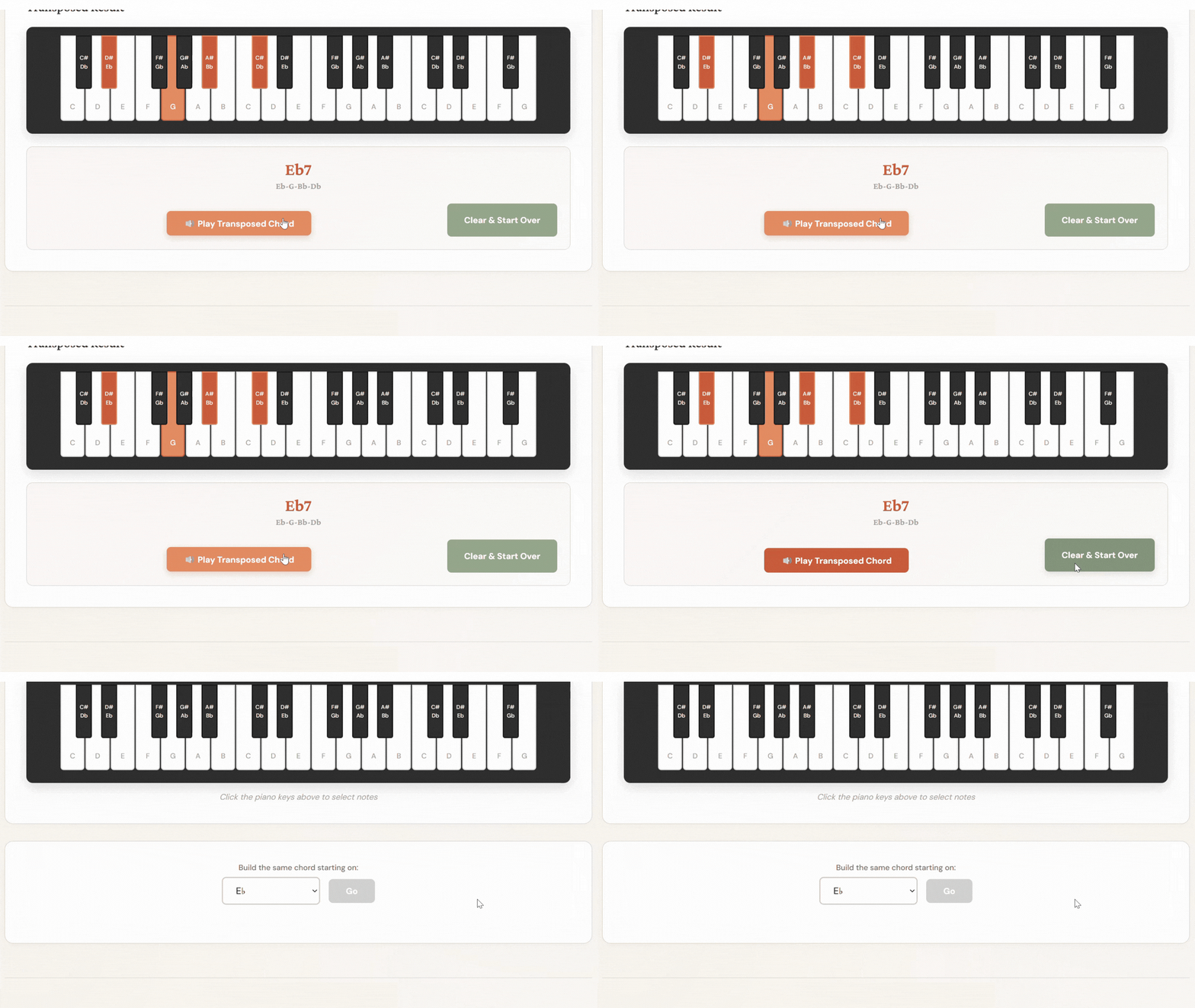
Ready to try out a new chord?
Just click the "Clear & Start Over" button
The Piano Keys
Chord Transposition Wizard
An interactive tool that's like having
a theory teacher by your side, anytime you need one.
How You'll Use It
Building a chord and
not sure if you got it right?
Input your notes into the Chord Transposition Wizard by clicking the keys on the keyboard.
The Wizard instantly identifies your chord, shows you alternative names (yes, the same notes can make chords with different names), and tells you which inversion it is.
Click the piano keys to build a chord
The Chord Transposition Wizard tells you the name of the chord, its inversion, and what notes are in it
Click the "Play Chord" button to hear how it sounds
Learned your chord starting on a certain note and you're ready to build that same chord on a different note?
Transposing chords is one of those skills that takes practice, but the benefits you gain are totally worth the effort.
Work out your answer first, then use the Chord Transposition Wizard to check it: enter your original chord, select your target key, and see if your transposition matches. When it doesn't, you'll catch exactly where you went wrong.
Click the drop-down menu to select the new note you want your chord to be built on
The Chord Transposition Wizard scrolls down to show you a keyboard with your new chord notes
The name and notes of your new chord are displayed beneath the keyboard
Click the "Play Transposed Chord" button to hear the chord in the new key
Works for any chord built on any key.
Ready to try out a new chord?
Just click the "Clear & Start Over" button
The Piano Keys
Chord Transposition Wizard
An interactive tool that's like having a theory teacher by your side, anytime you need one.
How You'll Use It
Building a chord and
not sure if you got it right?
Input your notes into the Chord Transposition Wizard by clicking the keys on the keyboard.
The Wizard instantly identifies your chord, shows you alternative names (yes, the same notes can make chords with different names), and tells you which inversion it is.
Click the piano keys to build a chord
The Chord Transposition Wizard tells you the name of the chord, its inversion, and what notes are in it
Click the "Play Chord" button to hear how it sounds
Learned your chord starting on a certain note and you're ready to build that same chord on a different note?
Transposing chords is one of those skills that takes practice, but the benefits you gain are totally worth the effort.
Work out your answer first, then use the Chord Transposition Wizard to check it: enter your original chord, select your target key, and see if your transposition matches. When it doesn't, you'll catch exactly where you went wrong.
Click the drop-down menu to select the new note you want your chord to be built on
The Chord Transposition Wizard scrolls down to show you a keyboard with your new chord notes
The name and notes of your new chord are displayed beneath the keyboard
Click the "Play Transposed Chord" button to hear the chord in the new key
Works for any chord built
on any key.
Ready to try out a new chord?
Just click the "Clear & Start Over" button
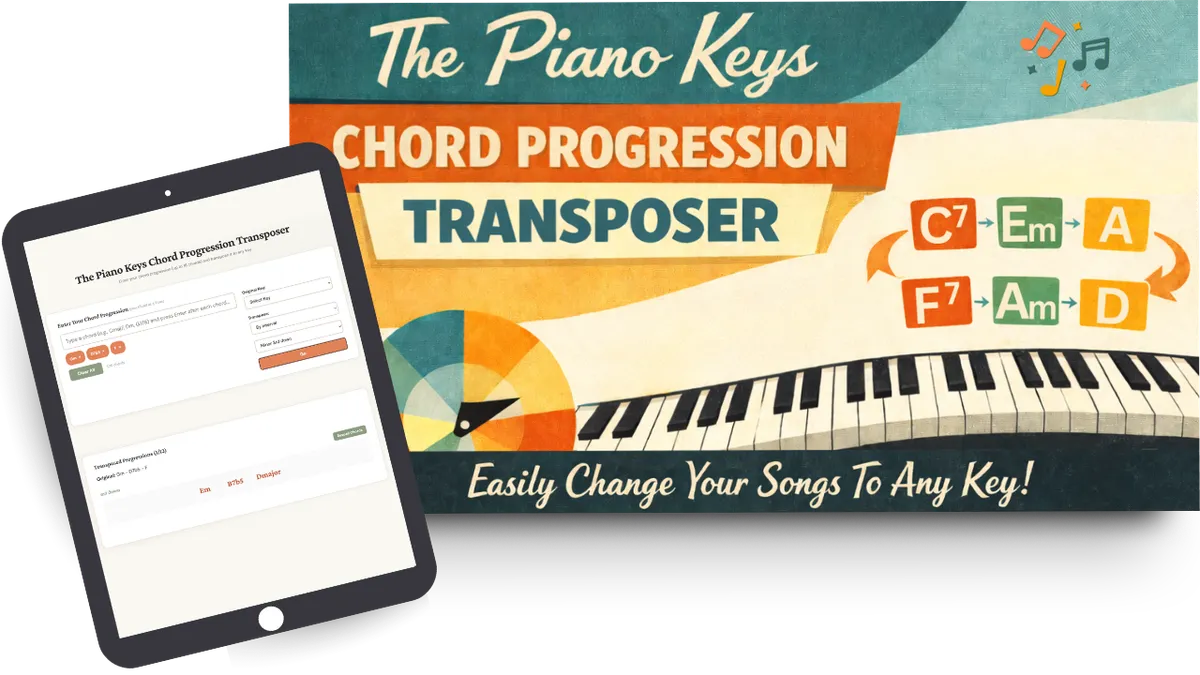
The Piano Keys
Chord Progression Transposer
An interactive tool that gives you the freedom
to change any chord progression to any key.
How You'll Use It
Found a song you love but
the chords are a bit above your piano skill level?
Instead of guessing which key might work better, type your chord progression into the Chord Progression Transposer.
You can audition up to 12 different keys side-by-side, hear how each one sounds, and choose what works best for you.
Do you play and sing, but the sheet music you have sits too high or too low for your vocal range?
Published music doesn't come in all keys, and many song sheets in the written keys may not be a good fit for your voice.
Figure out the chords of the song, verify them with the Chord Transposition Wizard (especially helpful if you're learning to hear chords by ear), then plug the whole progression into the Chord Progression Transposer.
Try different keys until you find the one that fits your voice best.
Practicing a chord progression you love and wondering how it would sound and feel in your fingers in a different key?
This is the perfect time to practice your transposition skills, then plug the chord progression into the Transposer tool to check your work.
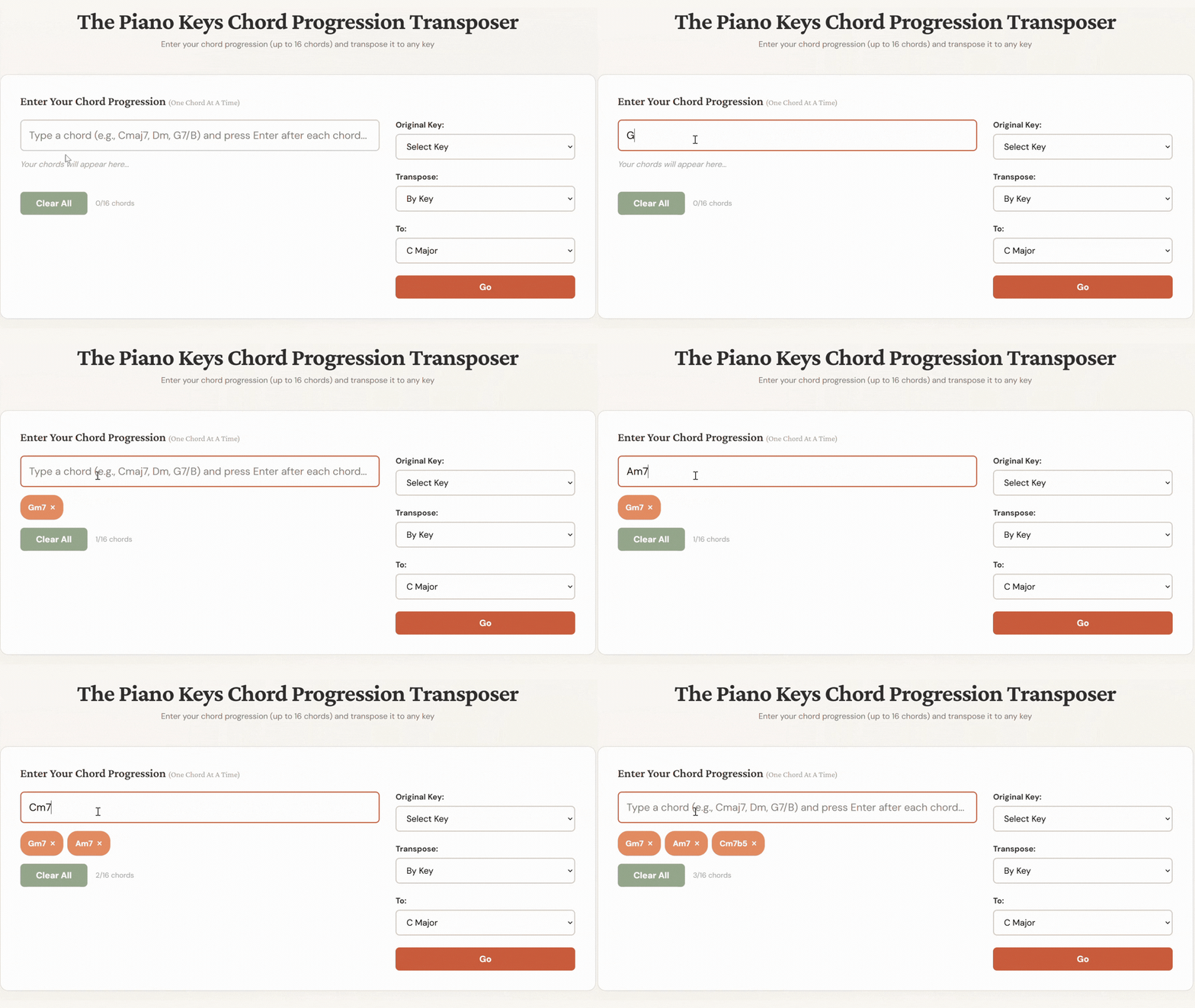
Enter the names of the chords in your chord progression, one at a time
You can transpose by key or by interval
Click "Go"
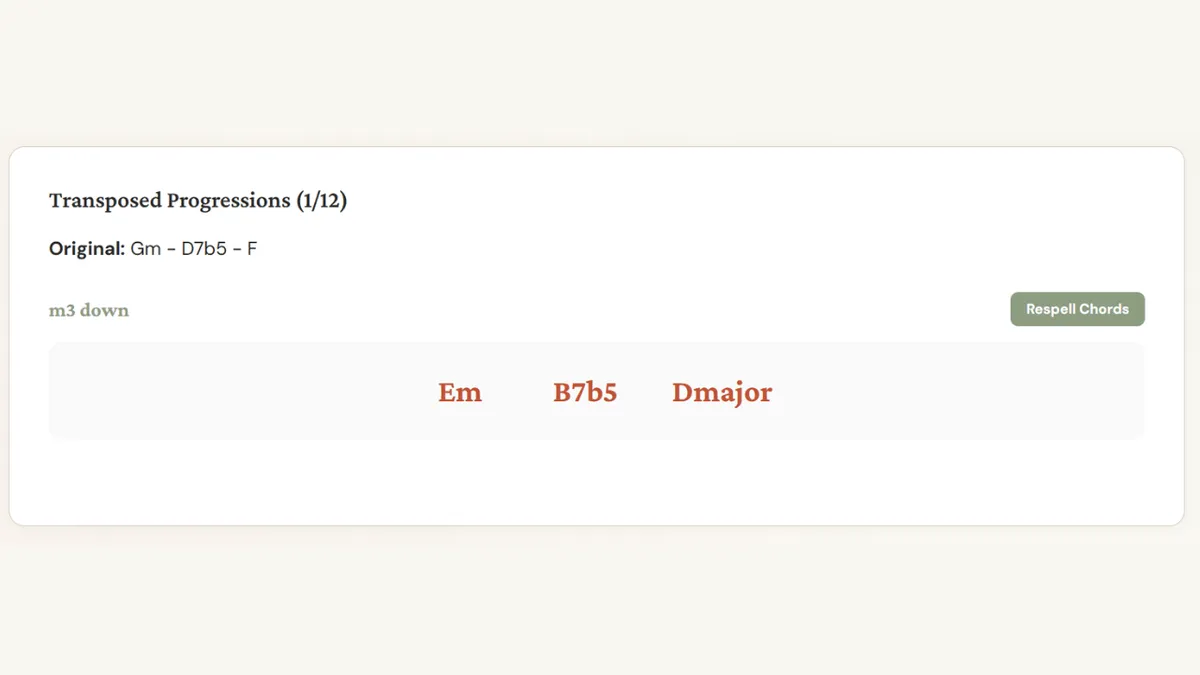
See your chords named in the new key
Click the "Respell chords" button to see an alternate spelling of your chords
You can transpose the same chord progression to up to 12 keys
The Piano Keys
Chord Progression Transposer
An interactive tool that gives you the freedom
to change any chord progression to any key.
How You'll Use It
Found a song you love but the chords are a bit above your piano skill level?
Instead of guessing which key might work better, type your chord progression into the Chord Progression Transposer.
You can audition up to 12 different keys side-by-side, hear how each one sounds, and choose what works best for you.
Do you play and sing, but the sheet music you have sits too high or too low for your vocal range?
Published music doesn't come in all keys, and many song sheets in the written keys may not be a good fit for your voice.
Figure out the chords of the song, verify them with the Chord Transposition Wizard (especially helpful if you're learning to hear chords by ear), then plug the whole progression into the Chord Progression Transposer.
Try different keys until you find the one that fits your voice best.
Practicing a chord progression you love and wondering how it would sound and feel in your fingers in a different key?
This is the perfect time to practice your transposition skills, then plug the chord progression into the Transposer tool to check your work.
Enter the names of the chords in your chord progression, one at a time
You can transpose by key or by interval
Click "Go"
See your chords named in the new key
Click the "Respell chords" button to see an alternate spelling of your chords
You can transpose the same chord progression to up to 12 keys
The Piano Keys
Chord Progression Transposer
An interactive tool that gives you the freedom to change any chord progression to any key.
How You'll Use It
Found a song you love but
the chords are a bit above your piano skill level?
Instead of guessing which key might work better, type your chord progression into the Chord Progression Transposer.
You can audition up to 12 different keys side-by-side, hear how each one sounds, and choose what works best for you.
Do you play and sing, but the sheet music you have sits too high or too low for your vocal range?
Published music doesn't come in all keys, and many song sheets in the written keys may not be a good fit for your voice.
Figure out the chords of the song, verify them with the Chord Transposition Wizard (especially helpful if you're learning to hear chords by ear), then plug the whole progression into the Chord Progression Transposer.
Try different keys until you find the one that fits your voice best.
Practicing a chord progression you love and wondering how it would sound and feel in your fingers in a different key?
This is the perfect time to practice your transposition skills, then plug the chord progression into the Transposer tool to check your work.
Enter the names of the chords in your chord progression, one at a time
You can transpose by key or by interval
Click "Go"
See your chords named in the new key
Click the "Respell chords" button to see an alternate spelling of your chords
You can transpose the same chord progression to up to 12 keys
These Tools Are Perfect For You If You
Are learning to build, play, and identify chords and want a way to check your own work
Play chord-based music and want to transpose progressions into different keys
Learn best with instant feedback, rather than waiting for your next lesson to find out if you're on track
Want tools you can use anytime, on any device
These Tools Are Not The Right Fit If You
Want to learn chord theory from the ground up — these tools are built to support chord practice you're already doing, not to teach the fundamentals
Prefer learning away from a screen — these tools live online, so you'll need a device and a little comfort clicking around to get the most out of them
These Tools Are Perfect For You If You
Are learning to build, play, and identify chords and want a way to check your own work
Play chord-based music and want to transpose progressions into different keys
Learn best with instant feedback, rather than waiting for your next lesson to find out if you're on track
Want tools you can use anytime, on any device
These Tools Are Not The Right Fit If You
Want to learn chord theory from the ground up — these tools are built to support chord practice you're already doing, not to teach the fundamentals
Prefer learning away from a screen — these tools live online, so you'll need a device and a little comfort clicking around to get the most out of them
These Tools Are Perfect For You If You
Are learning to build, play, and identify chords and want a way to check your own work
Play chord-based music and want to transpose progressions into different keys
Learn best with instant feedback, rather than waiting for your next lesson to find out if you're on track
Want tools you can use anytime, on any device
These Tools Are Not The Right Fit If You
Want to learn chord theory from the ground up — these tools are built to support chord practice you're already doing, not to teach the fundamentals
Prefer learning away from a screen — these tools live online, so you'll need a device and a little comfort clicking around to get the most out of them
Hi Awesome Pianist!
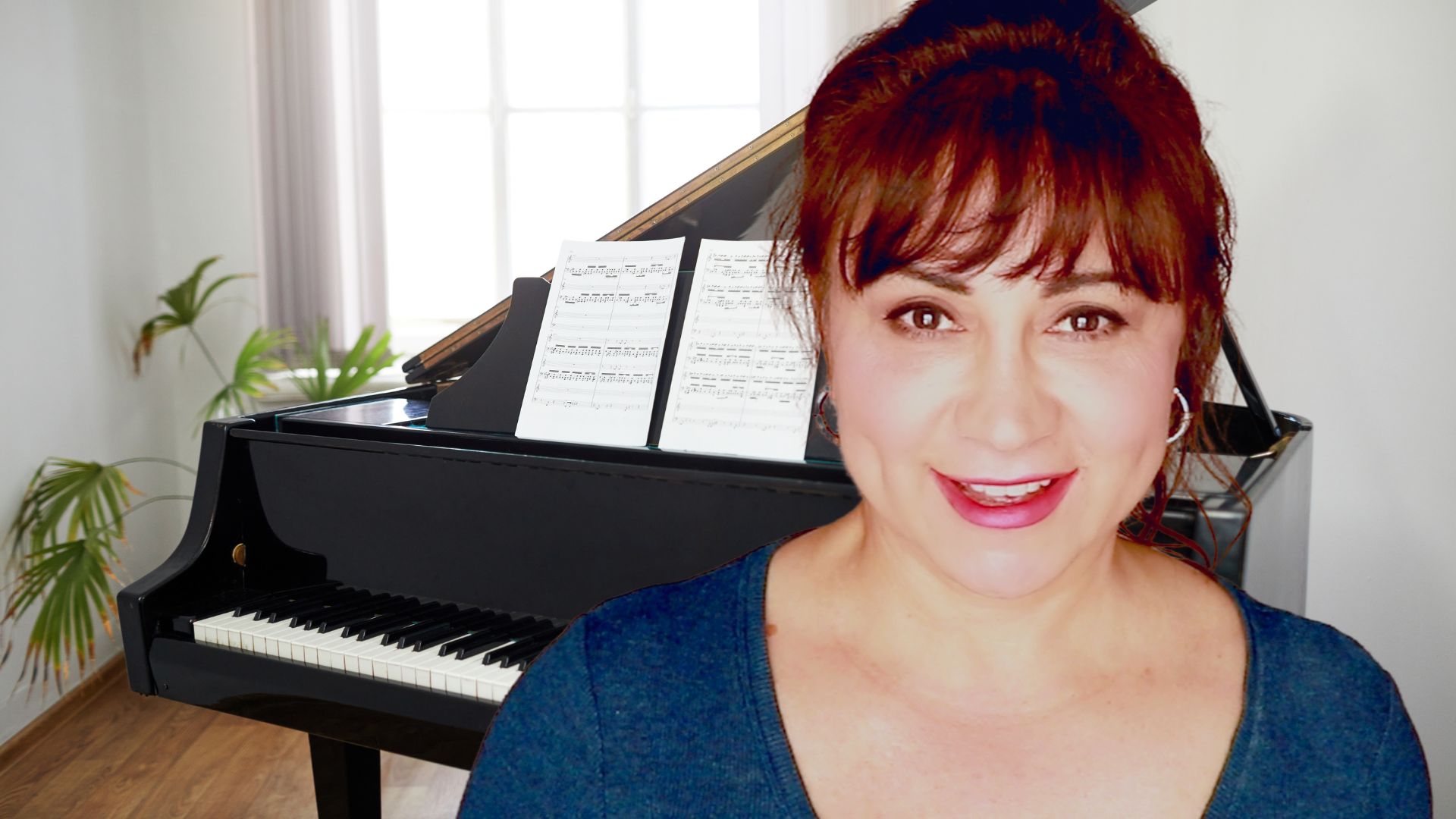
I'm Marina, your best piano-playing friend who just happens to be a professional musician and educator.
I built these tools for my students to have instant, reliable tutoring when working on their chord skills. But that's not all...
I know that learning to build, recognize and play chords in all their inversions is the first step in using chords to become the best musician you can be. The next step? Put those chords together to make chord progressions!
So I also created a tool to help you transpose your chord progressions to different keys.
And now you have the next best thing to a knowledgeable piano teacher by your side, day or night, anytime you need a quick check-up on your chord work - for a tiny fraction of the cost of even one piano lesson.
Hi Awesome Pianist!
I'm Marina, your best piano-playing friend who just happens to be a professional musician and educator.
I built these tools for my students to have instant, reliable tutoring when working on their chord skills. But that's not all...
I know that learning to build, recognize and play chords in all their inversions is the first step in using chords to become the best musician you can be. The next step? Put those chords together to make chord progressions!
So I also created a tool to help you transpose your chord progressions to different keys.
And now you have the next best thing to a knowledgeable piano teacher by your side, day or night, anytime you need a quick check-up on your chord work - for a tiny fraction of the cost of even one piano lesson.
Hi Awesome Pianist!
I'm Marina, your best piano-playing friend who just happens to be a professional musician and educator.
I built these tools for my students to have instant, reliable tutoring when working on their chord skills. But that's not all...
I know that learning to build, recognize and play chords in all their inversions is the first step in using chords to become the best musician you can be. The next step? Put those chords together to make chord progressions!
So I also created a tool to help you transpose your chord progressions to different keys.
And now you have the next best thing to a knowledgeable piano teacher by your side, day or night, anytime you need a quick check-up on your chord work - for a tiny fraction of the cost of even one piano lesson.
Need assistance? [email protected]
© 2026 The Piano Keys
By visiting this page, you agree to terms and conditions & privacy policy .
This site is not a part of the Facebook website or Facebook Inc. Additionally, This site is NOT endorsed by Facebook in any way. FACEBOOK is a trademark of FACEBOOK, Inc.